
Conversation Insights
Transformed customer issue investigation from a report-driven workflow into a self-serve analytics experience.

Overview
Conversation Insights is a self-serve analytics platform built for Air Canada contact centre teams.
Before the platform existed, customer conversation insights were delivered through weekly reports, making it difficult for teams to independently investigate customer issues and understand their operational impact.
As part of the Conversation Insights team at RozieAI, I led the end-to-end design of a dashboard experience that enabled teams to identify issues, understand their causes, and investigate the conversations behind them.
About RozieAI
RozieAI is a B2B customer experience (CX) solutions provider that designs and delivers AI-powered software solutions for clients in the airline and insurance industries.
Role
Owned the solution from initial problem definition through shipment, including user research, design iterations, high-fidelity prototypes, and close collaboration with engineering and product owners.
Client
Air Canada
Collaborators
1 Product owner, 5 Engineers, 1 Data Scientist, Designer (me)
Timeline
Q4 2024 — Q2 2025
Outcome
100% Adoption across Air Canada contact centre operations teams, replacing the previous manual reporting workflow.
Context:
Helping contact center teams turn customer conversations into operational insights.
Every day, hundreds of thousands of customers contact Air Canada to resolve booking issues, clarify policies, and seek support during disruptions.
These conversations contain valuable signals about customer pain points and service issues. While RozieAI's AI models could identify these patterns, the process of investigating and acting on them remained heavily manual.
Conversation Insights platform was created to help contact centre teams move from customer signals to operational action in a single workflow.

Problem:
Customer issue investigation was fragmented across reports, systems, and people.
Before Conversation Insights, AI-generated customer insights were delivered through weekly reports prepared by RozieAI product owners.
The reports helped teams identify emerging issues, but understanding why those issues were occurring required additional investigation across multiple sources. Teams often moved between reports, AWS Connect, and follow-up discussions with RozieAI to connect insights with operational data and customer conversations.
This fragmented workflow slowed operational decision-making and created an ongoing dependency on RozieAI stakeholders for investigation and support.
↪ Air Canada contact centre teams could access insights, but the fragmented process slowed their operational decision-making.
04
Contact centre teams consisting a total of 25 members relying on weekly insight reports.
↪ RozieAI product owners spent significant time manually preparing reports, reducing time for higher-value strategic work.
03
Product owners preparing reports and supporting follow-up analysis on a weekly basis.
The opportunity was to transform customer issue investigation into a self-serve workflow, enabling contact centre teams to independently understand and act on customer issues.
Discovery & Research Insights
Understanding the System:
Users, information, and how teams analyzed customer issues
During discovery, I worked with product owners, data scientists, and Air Canada stakeholders to understand how insights were generated, delivered, and operationalized
Who are the users?
I learned that the system supported two distinct but connected roles.
Contact Centre Managers
who mainly focused on identifying emerging issues and determining where attention was needed.
Operation Analysts
who mainly focused on understanding issues and tracing them back to specific calls.
What data was being shared?
Customer conversation data was transformed into two layers of information.
Primary Topic
Customer Intent
Root Cause
Sentiment at Start
Routing Profile
Queue ID
Agent Username
Call Channel
↪ First, AI-derived signals such as primary topics, root causes, and sentiment helped summarize what customers were experiencing.
↪ Second, operational metadata from the AWS Connect call system, including routing profiles, queues, and agent-level attributes, provided context on who & how those conversations were handled.
↪ Additionally, the Air Canada Contact Centre teams received call KPI data such as call resolution rate, call volume, etc.
How did Air Canada contact centre teams analyze customer issues?
In order to understand how Air Canada contact centre teams approached analyzing customer issues, I conducted 6 interviews with team members and found that insights were rarely consumed in isolation. Instead, they served as starting points for a broader analysis process into their operational metadata.
The decision-making workflow typically looked like this:
01
Scope
Define a time window to frame the analysis.
02
Identify Issues
Detect unusual patterns and emerging customer concerns.
03
Understand Causes
Use summaries and transcripts to understand what customers are experiencing.
04
Trace Operational Impact
Identify where the issue is occurring using call records and operational data.
Key Insights
The investigation workflow revealed that insights were not endpoints, but starting points for understanding and resolving customer issues.
Teams used customer insights to identify issues, then combined conversation data and operational metadata to understand causes, trace impact, and take action.
This workflow enabled teams to take targeted operational actions such as identifying coaching opportunities for agents and refining IVR routing based on emerging customer issues.
Ultimately, this workflow model set the foundation for how the product should be designed.
How might we enable Air Canada contact centre teams to independently investigate customer issues from identification to operational action?
Solution
Dashboard with Complementary Modes:
Supporting both signal detection and root-cause investigation within a dashboard interface
To support the investigation workflow which revealed two distinct modes of analysis that required different information densities, I designed the dashboard with two complementary modes: Overview and Table View.
Overview
Teams needed a quick way to identify emerging customer issues without navigating call-level details. I designed Overview as the signal detection layer, surfacing key metrics and conversation insights in a highly scannable format. This helped teams identify where attention was needed before moving into deeper investigation.
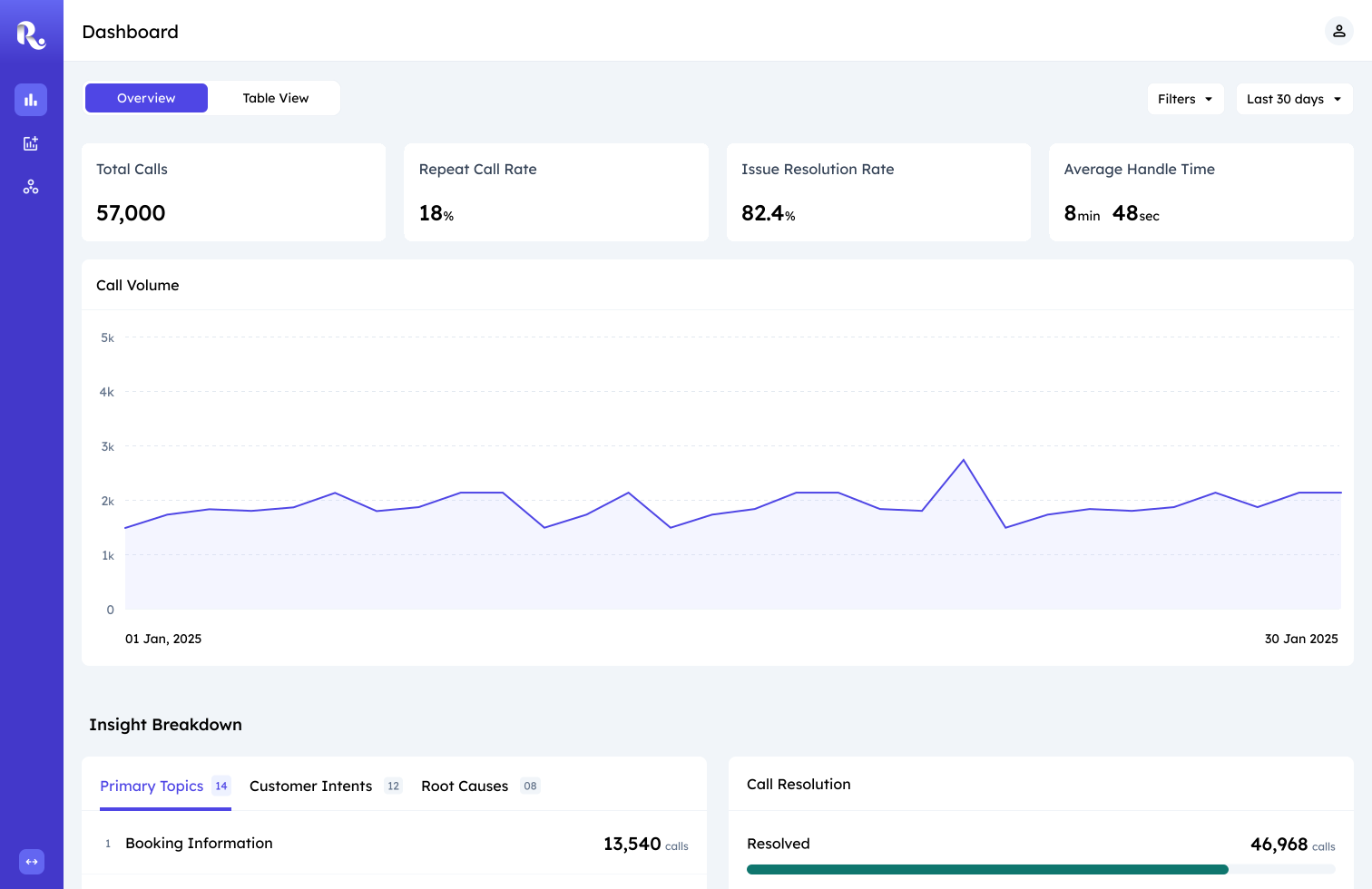
Overview: Top View
Insight Cards
Traditional charts like bar charts required users to compare trends, interpret legends, and hover for details before understanding what mattered. I replaced the idea of embedding these visualizations with ranked insight cards that surfaced issues and call volumes directly. This reduced interpretation effort and helped teams prioritize investigation faster.
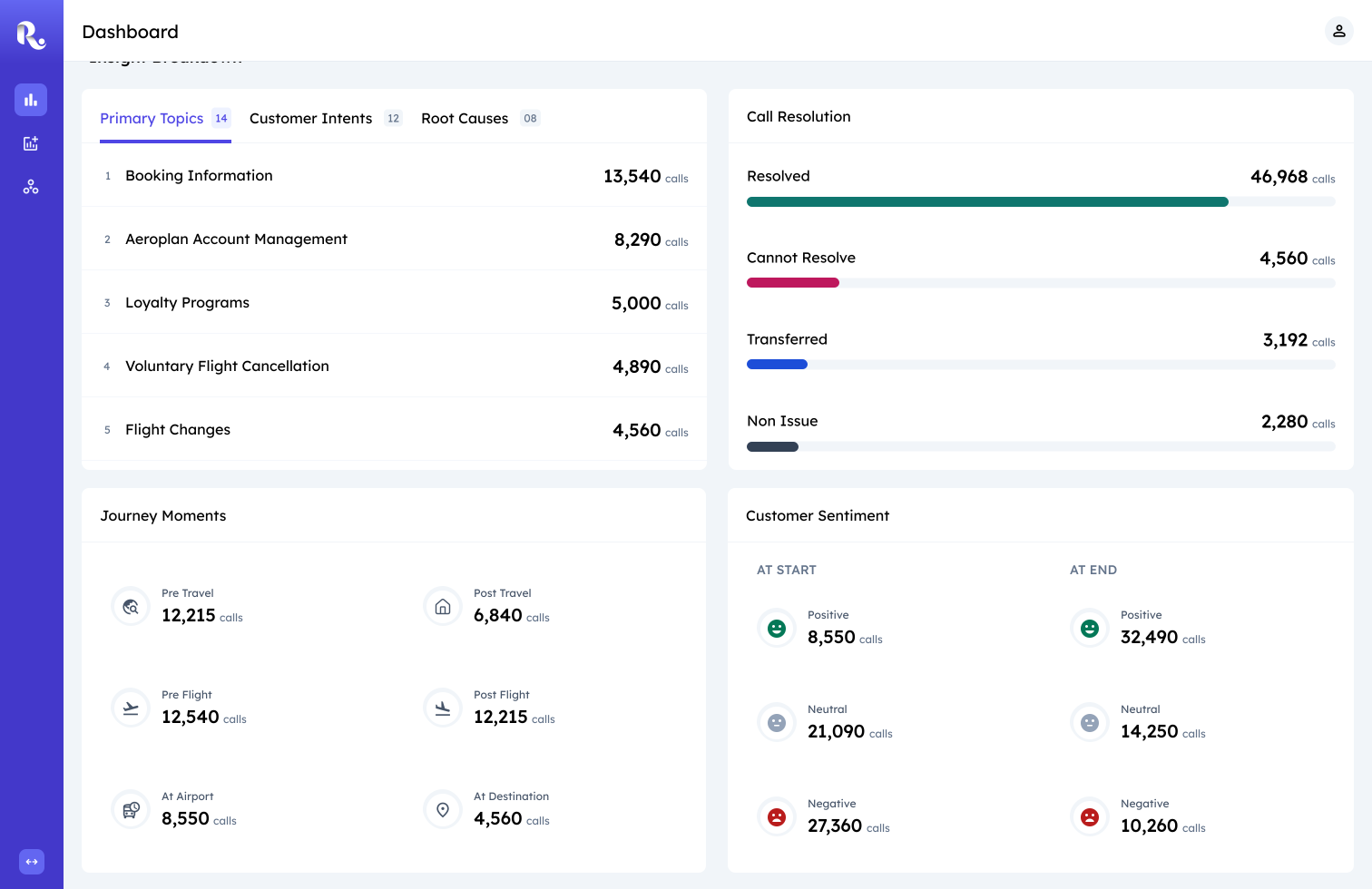
Overview: Bottom View
Table View
High-level signals alone were not enough to explain why issues were occurring. I designed Table View as the investigation workspace, exposing call-level summaries and 60+ operational attributes. This gave teams the flexibility to trace patterns back to specific calls, queues, and routing paths.
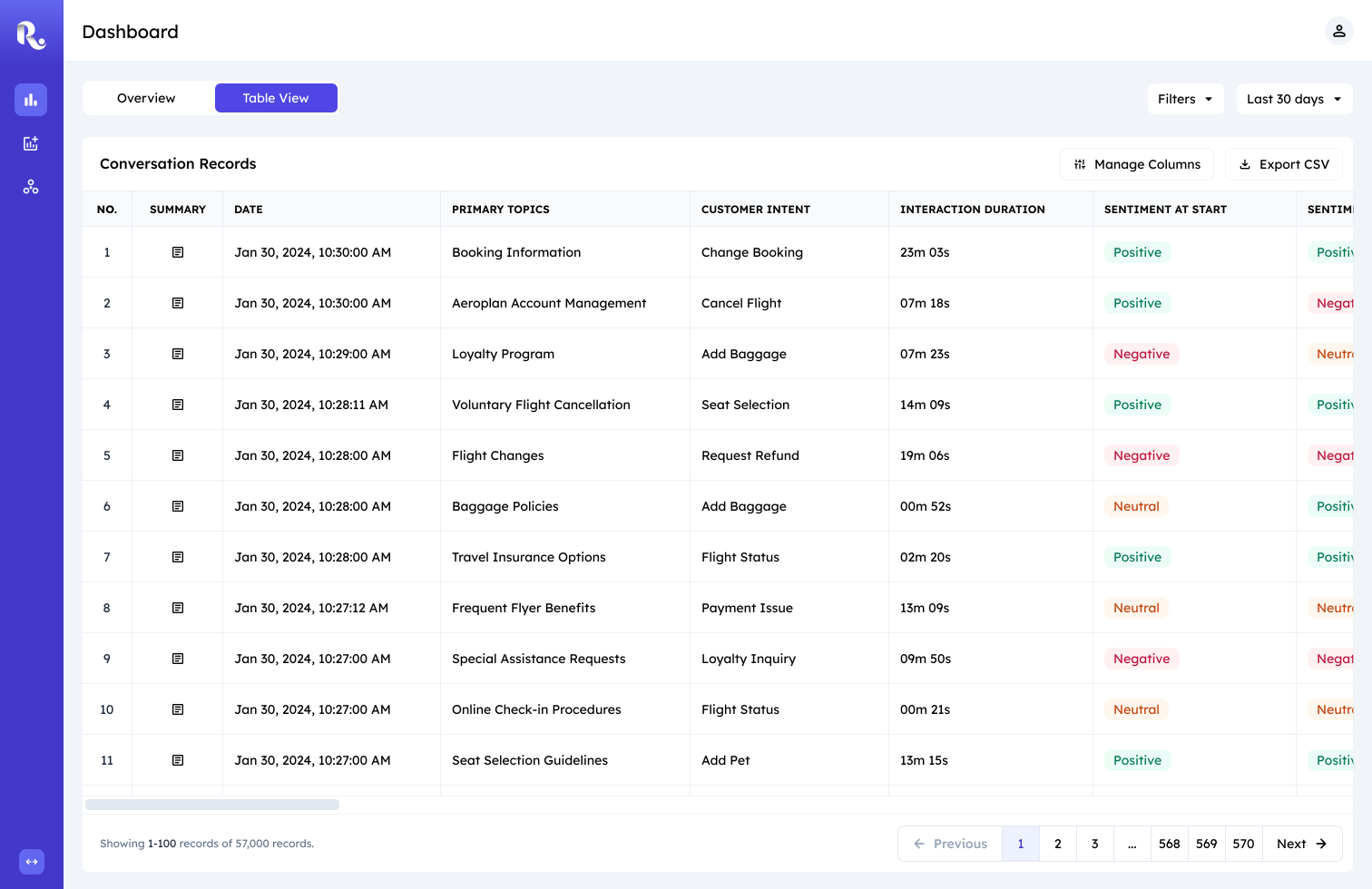
Table View
Summary Cards
Reading full call transcripts slowed investigation and added unnecessary effort. I introduced AI-generated summary cards directly within the workflow to provide quick context behind each conversation. Teams could understand what happened before deciding whether deeper review was necessary.
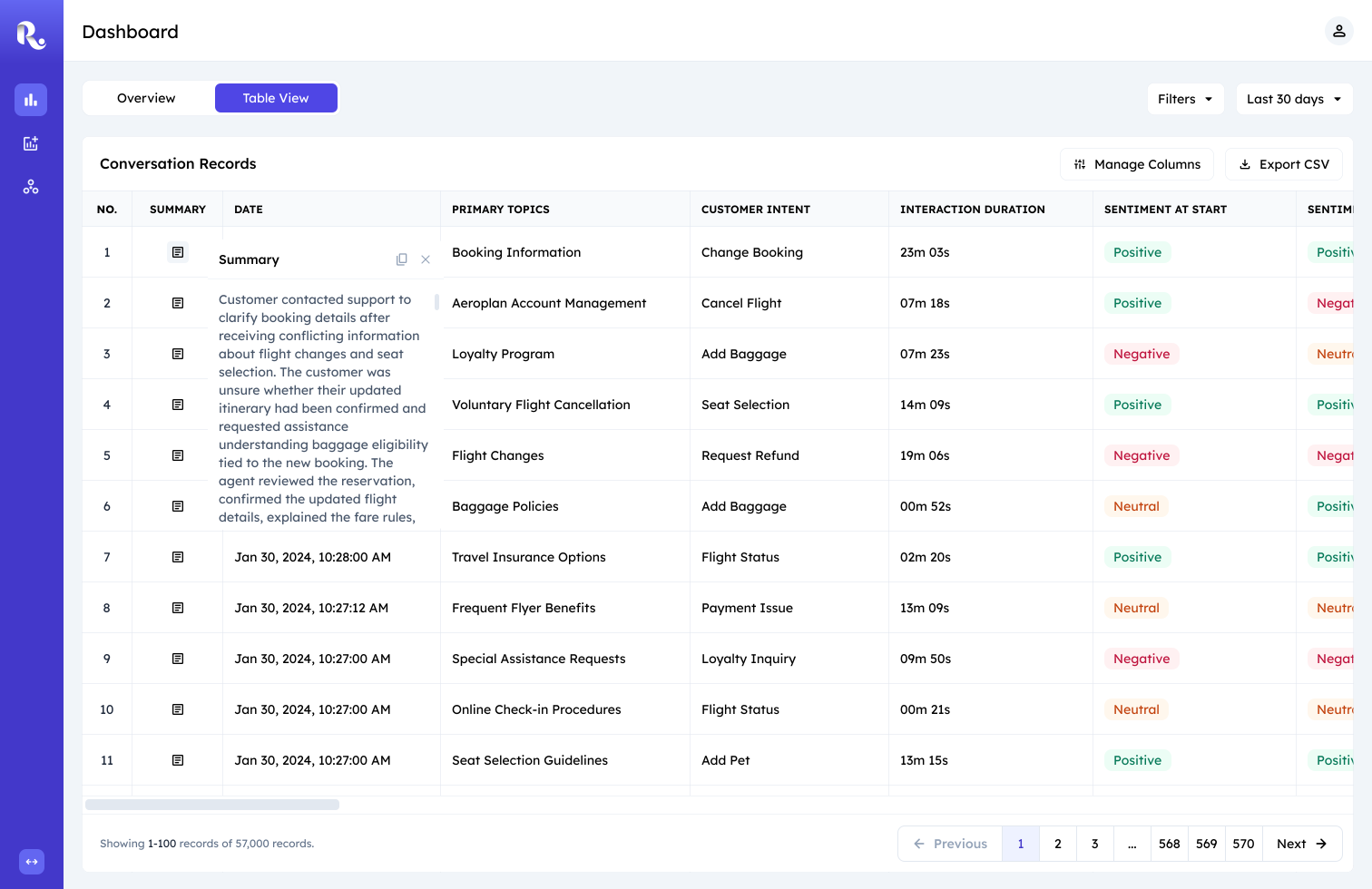
Call Summary Card
Filter Operations
Teams rarely investigated using a single condition. Most investigations relied on layered filters across topics, sentiment, and operational metadata.
I designed a query-based filtering system that supported complex filtering without cluttering the interface.
Filters and date ranges remained shared across both views, allowing teams to continue investigation without rebuilding context.
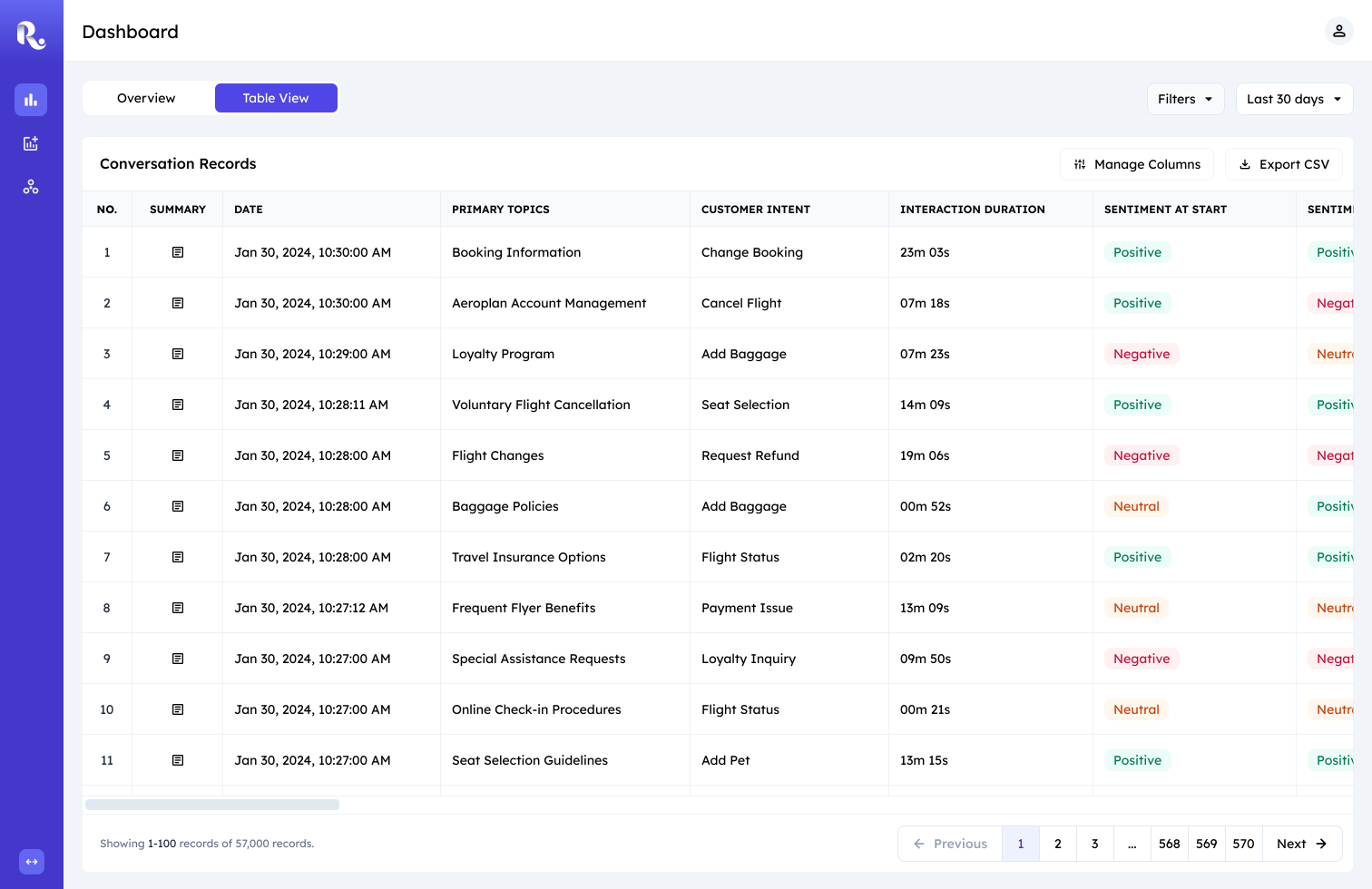
User views table view
Filter Prototype
Key Decisions
Information Architecture & Layout:
Translating how teams identify and analyze issues into a dashboard structure.
With a clear understanding of how teams investigated customer issues, I began exploring how that workflow could be translated into a dashboard experience.
I explored multiple layout directions to determine how signal detection and investigation should coexist within the product. These wireframes became discussion tools for evaluating tradeoffs between separation, continuity, and cognitive load with my design lead.

Exploration 1: Prioritizing Separation through Navigation
Exploration 1: Prioritizing separation through navigation
I initially explored treating Overview and Table View as separate destinations to create strong separation between signal detection and investigation. However, a problem with this approach was determining where to place filters.

Exploration 2: Full Contextual Continuity
Exploration 2: Full contextual continuity
I explored combining both workflows within a single interface to preserve context and reduce switching.
While this improved continuity, the density of signals and operational details would increase cognitive load and would weaken rapid scanning.

Exploration 3: Balancing Separation and Continuity
Exploration 3: Balancing separation and continuity
The final direction introduced Overview and Table View as complementary modes within a shared dashboard experience.
This preserved distinct cognitive spaces for rapid signal detection and detailed investigation while maintaining continuity through shared filters.
Information Modelling
Reducing Interpretation Cost
Next, to help teams identify important issues quickly, I explored different ways of presenting insight data. The goal was not just to surface information, but to reduce the effort required to interpret it.
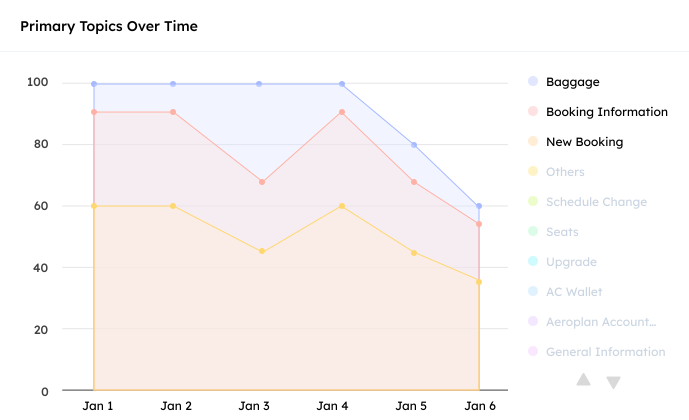
Version 1: Rich visualization
Version 1: Rich visualization → High Interpretation Cost
I initially explored multi-series visualizations to surface trends across conversation topics. However, interpreting the data required multiple interactions—hovering to reveal values, toggling legends, and navigating through additional topics. This introduced unnecessary interpretation cost and made it difficult to quickly identify the issues that required attention.
During click-through reviews, users spent more time interpreting the chart mechanics than digesting the underlying topics.

Version 2: Ranked Insight Cards
Version 2: Ranked Insight Cards → Low Interpretation Cost
To reduce interpretation effort, I explored ranked insight cards that surfaced the most important topics along with the volume directly. This removed the need for chart interactions and made it easier to understand the most common customer issues at a glance.
Filter Mechanism
Supporting Complex Analysis
Filtering became critical for narrowing investigations and getting into specific call records. The challenge was designing a filtering system that could support over 60 operational attributes without overwhelming the interface.

Version 1: Column Filters → High Visual Complexity
Version 1: Column Filters
I initially explored column-level filters that exposed filtering controls directly within the table. While this provided quick access, the approach introduced visual clutter and became increasingly difficult to scale as more attributes and filter combinations were added.
During feedback review calls, it became clear that users rarely filtered by a single attribute. Investigations often involved combining multiple operational attributes to isolate specific call patterns.

Version 2: Query Builder → Scalable Complexity
Version 2: Query Builder
To better support these workflows, I adopted a query-builder pattern that allowed users to construct complex filter combinations on demand. By hiding complexity until needed, the interface remained focused on the data while still supporting advanced investigations.
The pattern also aligned well with implementation constraints, allowing engineering to ship a single reusable filtering component instead of maintaining dozens of independent column filters.
Impact
The Real Deal
Adoption
Adopted by four contact center teams within the client organization and demonstrated to three external clients, all of whom expressed interest in rollout.
Efficiency Gain
Replaced a fully manual reporting workflow, enabling contact center teams to access and investigate customer insights independently.
Qualitative Validation
Broader adoption across teams and strong stakeholder feedback reinforced the platform’s role as a recurring operational tool.
Business Outcome Tie-In
The platform’s success led to new feature requests (under NDA) and supported a renewed client contract, reinforcing its long-term business value.
Thanks for Reading!
Thanks for following along! While I've walked you through the key strategic decisions, there's a lot more to the story.
I'd love to chat more about the detailed design iterations and the process of balancing business goals and engineering constraints. If you're interested in hearing more, I'm always up for a conversation!